
How Smart Home Electrical Design Prevents Costly Rewiring Later
When you invest in a new home or a major renovation, you’re not just buying bricks and mortar—you’re creating a living ecosystem that needs to adapt to ever-advancing technology. Smart thermostats, voice-controlled lighting, integrated security cameras and EV chargers are no longer futuristic fantasies; they’re becoming everyday expectations. Yet many homes are still wired as if 1995 never ended. Ripping out walls a year or two after moving in because you forgot to run network cabling isn’t just inconvenient; it’s expensive, messy and entirely avoidable. A thoughtful smart home electrical design functions like the nervous system of your house, carrying power and information to every corner so that you can add new devices without tearing it apart.
Why Electrical Design Is the Key to Smart Home Success
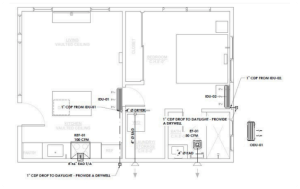
So what exactly is smart home electrical design? It’s the art and science of planning your home’s wiring including power circuits, data cables, control networks and distribution panels—to support current automation features and whatever innovations come next. Instead of relying solely on Wi-Fi and a few outlets, a well-designed smart home has:
- A structured wiring backbone with Cat6 or fiber optic cables for high-speed data distribution.
- Dedicated circuits for power-hungry devices like home automation controllers, motorized shades and audio amplifiers. Low-voltage wiring for thermostats, occupancy sensors, keypads and security devices. Conduits and empty junction boxes strategically placed so new cables can be pulled later without opening the walls.
- An oversized service panel with room for future breakers, solar connections and EV chargers.
This level of planning doesn’t just make your gadgets work better; it protects your wallet. Consider that rewiring a typical home can cost from a few thousand dollars to tens of thousands depending on size and complexity. That expense comes from labor, drywall repair, permits and potential panel upgrades—costs that often dwarf the price of running extra cables during construction. Think of smart electrical design as installing flexible conduit in the foundation of your home; you’ll thank yourself later when you can add a charging station or battery backup without patching walls.
Design Principles for a Future-Ready Smart Home
Whether you’re working with a custom builder or updating an existing structure, these design principles help ensure your smart home remains adaptable for decades:
1. Create a Structured Wiring Backbone
Just as the spine supports your body, structured wiring supports your home’s communication. Run Cat6 or Cat6a Ethernet cables to every room—even if you plan to rely on Wi-Fi. Hardwired connections offer more bandwidth and reliability for devices like streaming boxes, smart TVs, gaming consoles and networked speakers. Include coaxial cables for cable TV or satellite, and fiber or conduit for future technologies. Use a centralized media panel or rack to terminate these cables and house routers, switches and patch panels. Labeling each cable and documenting your network will save hours of troubleshooting later.
2. Separate Power and Data
High-voltage power lines can create interference for low-voltage data and control cables. To maintain signal quality, run low-voltage wiring in separate conduits or at least 12 inches away from power lines. Use shielded twisted-pair cables where necessary. For power-hungry devices like motorized shades, gate controllers or whole-house audio amplifiers, install dedicated circuits back to the service panel. This prevents nuisance tripping and ensures consistent operation.
3. Plan for Wireless Access Points
Even with robust wired connections, strong wireless coverage is essential for mobile devices and IoT sensors. Pre-wire ceiling-mounted locations for wireless access points (WAPs) in central areas on each floor. Running Ethernet and power to these spots allows you to install professional-grade access points that blanket your home in reliable Wi-Fi. Place WAPs away from sources of interference like microwaves or large metal appliances, and avoid dead zones created by thick masonry walls.
4. Use Conduit and Pull Strings Liberally
o. Installing flexible conduit (such as ENT or rigid PVC) with pull strings behind walls and between floors makes future upgrades painless. Conduit runs to media walls, ceiling cavities and exterior walls let you pull new cables—like fiber optic, speaker wire or power for an EV charger—without cutting into drywall. Conduit may seem excessive now, but the cost is negligible compared to retrofitting later.
5. Oversize Electrical Service and Panels
demands due to multiple processors, network devices and possibly renewable energy systems. Discuss with your electrician whether to install a 200-amp or larger service panel, and ensure it has plenty of extra breaker slots. Consider dedicated subpanels for high-current equipment or future solar inverters. Including junction boxes and conduit stubs near garages, driveways or mechanical rooms will accommodate future EV chargers, battery storage or generator transfer switches.
6. Integrate Safety and Standards
Safety isn’t optional. Use ground-fault circuit interrupters (GFCIs) in kitchens, bathrooms and outdoor outlets to prevent shock. Arc-fault circuit interrupters (AFCIs) reduce fire risk by detecting dangerous electrical arcs. Surge protection at the main panel protects sensitive electronics from voltage spikes. Adhere to local and national electrical codes such as the National Electrical Code (NEC) in the U.S. If your home includes automation for HVAC, lighting or security, ensure components meet industry standards like UL listings and IEEE or ISO/IEC protocols for data communication. Work with licensed electricians and certified smart home integrators to ensure compliance and insurance coverage.
7. Document Everything
A smart home is only as good as its documentation. Keep a detailed wiring plan, including cable types, routes, termination points and device locations. Photograph wiring before walls are closed. Label each cable at both ends. Provide a legend for breaker assignments. Not only will this make troubleshooting easier, but it will also increase the value of your home if you decide to sell—future buyers appreciate knowing exactly what’s behind the walls.
The Cost of Rewiring vs. Pre-Wiring
Homeowners are often shocked by how much rewiring can cost. Prices vary by region and house size, but rewiring a typical home can range from $3,000 to $20,000 or more. Several factors drive this expense:
- Labor intensity: Electricians must fish wires through finished walls or open them entirely. Working around existing utilities and structures is time-consuming.
- Drywall repair: Cutting access holes means you’ll pay for patching, sanding, painting and sometimes replacing trim or tile.
- Permits and inspections: Most jurisdictions require permits for electrical work, adding fees and scheduling inspections that can delay your project.
- Panel upgrades: Older homes may need their service upgraded to handle new loads. Upgrading to a 200-amp panel can add several thousand dollars.
- Cleanup and disruption: Living through a rewire often means moving furniture, dealing with dust, and sometimes leaving the house during major work.
By contrast, pre-wiring during construction is straightforward. The walls are open, the electrician has clear access and the overall cost per foot of cable installed is minimal. Running extra Cat6 to each room or leaving conduit blank costs little in materials and labor when compared to later retrofits. Even if you don’t use those cables immediately, having them in place prevents future headaches.
Integrating Smart Systems: Room-by-Room Considerations
A truly connected home demands attention to how individual rooms function. Here are some best practices for common spaces:
Living Room and Media Rooms
Home theaters and living rooms need robust wiring for audio, video and lighting control. Install speaker wire to ceiling or in-wall speakers for surround sound. Run HDMI and Cat6 from the media cabinet to the television or projector. Provide conduit to a media wall so new devices can be added easily. Consider centralized control wiring for lighting scenes—your guests will appreciate a single keypad near the entrance that dims the lights, drops the shades and starts a movie.
Kitchens and Dining Areas
Kitchens are electrical hotspots with appliances, lighting and often integrated audio. Pre-wire under-cabinet lighting and power outlets above cabinets for accent lighting. Plan for a small wall-mounted touch screen or tablet to control music, check recipes or monitor security cameras. Dedicate circuits to power-hungry appliances like ovens and microwaves. If you plan to install a smart refrigerator or connected cooktop, ensure network cabling is accessible.
Bedrooms
Bedrooms are retreats that benefit from network drops at each bedside for smart alarms or charging stations. Install low-voltage cabling for keypads or touch panels that control lighting, climate and media. Pre-wire for ceiling speakers if you enjoy ambient music. Don’t forget security contacts on windows and motion sensors near doorways for integration with your alarm system.
Bathrooms
Modern bathrooms often feature smart mirrors, heated floors and integrated speakers. Run dedicated circuits for heated towel racks or floor warming systems. Install occupancy sensors to automatically turn on lights and fans. Use low-voltage cabling for Bluetooth speakers or a small display if you plan to catch the news while getting ready. Always follow code requirements for GFCI protection in wet areas.
Home Office or Study
With remote work more common, a reliable home office network is essential. Run multiple Cat6 drops to your desk area for computers, VoIP phones and printers. Provide additional outlets for monitors and charging. Consider a dedicated circuit for uninterruptible power supplies (UPS) that protect sensitive electronics from outages. Integrate wiring for motorized shades to reduce glare during video calls.
Outdoor Living Spaces
Don’t forget outside. Pre-wire for landscape lighting, smart irrigation controllers, security cameras and outdoor speakers. Provide conduit for future pool or hot tub wiring. If you envision an outdoor kitchen, include circuits for appliances and low-voltage wiring for lighting control. Plan for weather-rated network drops near patios in case you want a mounted TV or a Wi-Fi mesh node.
Working with Smart Home Design Professionals
While you can research smart home systems yourself, there’s no substitute for hiring experienced professionals. Smart home engineering services combine expertise in electrical design, networking and automation. Here’s how professionals add value:
- Coordination: Integrators work with architects, general contractors, electricians and HVAC installers to ensure wiring routes don’t conflict with ducts, plumbing or structural elements. Early coordination avoids costly rework.
- Product knowledge: They stay up to date on current automation platforms, from lighting systems like Lutron and KNX to whole-home controllers like Control4 or Savant. They know which devices talk to each other and which protocols (Z-Wave, Zigbee, Thread) suit your needs.
- System integration: Professionals design a cohesive system where lighting scenes can trigger music, security systems can notify lighting to flash in an alarm, and climate control responds to occupancy. They write the programming that makes your home feel seamless.
- Compliance and safety: Licensed electricians ensure that wiring meets code and that panels are sized properly. Certified integrators follow best practices for cable termination and surge protection.
- Documentation and support: A reputable firm provides a detailed wiring plan, diagrams and manuals. They offer support for future upgrades and can troubleshoot issues quickly because they understand your home’s infrastructure.
When selecting a smart home professional, look for certifications such as CEDIA (Custom Electronic Design & Installation Association) membership, licensed electrical credentials, and positive references. Discuss your goals, budget and timeline up front. A good integrator will propose solutions that scale—start small with lighting and security, then add audio, climate control or energy management as your needs evolve.
Benefits Beyond Technology
Smart home electrical design isn’t just about toys. Thoughtful design offers tangible benefits:
- Energy efficiency: Integrated sensors and intelligent thermostats reduce energy consumption by adjusting lighting and HVAC based on occupancy and daylight levels.
- Safety and peace of mind: Smart locks, cameras, smoke detectors and leak sensors notify you instantly of issues. Remote monitoring lets you check on pets or deliveries while away.
- Accessibility: Voice control and automation simplify life for the elderly or those with mobility challenges. Automated lighting, door locks and window treatments respond to simple commands.
- Resale value: Homes wired for automation command higher prices because buyers recognize the value of pre-installed infrastructure. A documented wiring plan and equipment list show that the home is future-ready.
- Aesthetic integration: Concealed cables and centralized equipment prevent unsightly wires and boxes, preserving clean lines and architectural integrity.
- Convenience and lifestyle: Imagine arriving home as the garage door opens, the hallway lights brighten to a welcoming scene, and your favorite playlist starts. Once you experience a well-integrated home, you’ll wonder how you lived without it.
Frequently Asked Questions
Do I need to wire my entire house for a smart home?
You don’t need to wire every inch of your home, but including network cabling and conduits in key areas makes future upgrades easier. Start with essential spaces like living rooms, offices and bedrooms. Even if you rely on Wi-Fi today, wired connections offer faster speeds and lower latency for demanding devices.
Can I retrofit smart home wiring in an existing house?
Yes, you can retrofit wiring, but it’s more labor-intensive and costly than pre-wiring. Electricians may need to cut access holes and fish wires through walls. If you’re renovating a room, take the opportunity to add conduit and extra cables. Wireless solutions can fill gaps, but they may not match the reliability of wired connections.
How much should I budget for smart home pre-wiring?
Budget depends on your home’s size and desired systems. As a rough guide, integrated smart home wiring can cost $2–$7 per square foot when installed during new construction. This includes network cabling, audio and video wiring, conduit and panel upgrades. Investing in quality cabling and flexible infrastructure up front often costs less than a single future rewire.
What about cybersecurity?
Smart homes connect to the internet, so cybersecurity is critical. Use strong, unique passwords for your Wi-Fi and device accounts. Keep routers, smart hubs and devices updated with the latest firmware. Consider professional network design that segments smart devices from personal computers. Some advanced systems include firewall appliances and intrusion detection to protect your home network.
Should I wait for technology to settle before wiring?
Technology will always evolve. The goal of smart home electrical design isn’t to anticipate every device but to build a flexible infrastructure—plentiful conduits, extra network cabling and robust panels—that can adapt to whatever comes next. Waiting only delays the enjoyment of features that are already mature, like lighting control, whole-home audio and smart climate systems.
Conclusion and Next Steps
Creating a smart home isn’t about installing a few gadgets; it’s about laying a foundation that can support technology for decades. Proper smart home electrical design weaves power, data and control into a cohesive fabric that lets you embrace new innovations without costly rewiring. By investing in structured wiring, dedicated circuits, conduits and oversized panels, you ensure that your home grows with you.
If you’re planning a new build or a major renovation, make smart home design services part of your team from day one. Work with experienced smart home engineers and licensed electricians to map out wiring routes, choose the right materials and integrate automation systems seamlessly. The effort you put into design now will pay dividends in convenience, energy savings, safety and resale value later. Don’t settle for a home that’s outdated before you move in—design for the future today.